
PixShaft
CeuiLiSAComics
4.917.00 Reviews
- Version
- 4.9.9
- Installs
- 10.00K
- Age Rating
- Everyone
Screenshots

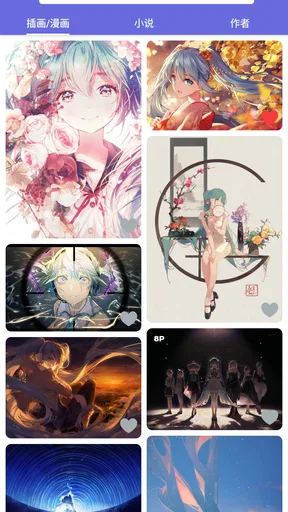


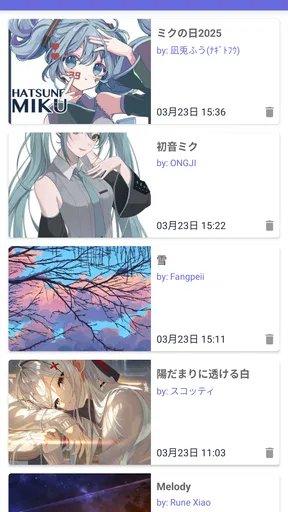
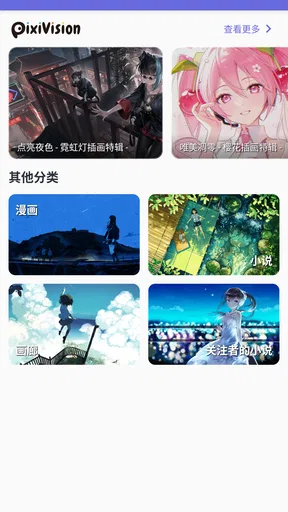

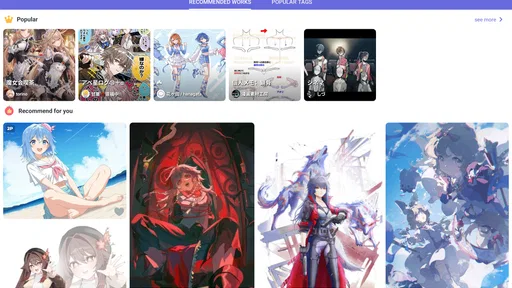
Our Review of PixShaft
 Analysis by Appyee
I approached PixShaft as a browsing tool rather than a full creative studio. Its purpose is simple: help illustration fans find comics, artwork, and novels in one place. After spending time with it, I think its biggest appeal is the way it encourages discovery. Instead of opening a single title with a fixed goal, I can move from one creator’s work to another and let the browsing session develop naturally.
That freedom is also where some users may get stuck. A discovery-focused app can feel less predictable than a conventional comic reader, especially when I want to return to one specific work, understand a new interface immediately, or move through content without interruptions from unfamiliar navigation. My experience with PixShaft was best when I treated it as a place to explore, not as a replacement for every specialized reading app.
What PixShaft is really useful for
CeuiLiSA presents PixShaft as an app for illustration enthusiasts, and that description matters. This is not merely a shelf for finished comics. The combination of illustrations, comics, and novels gives the app a broader creative range, so I can use it for visual inspiration, casual reading, or discovering creators whose work I might otherwise miss.
The app is free and carries an Everyone content rating, which makes it approachable for a wide audience. It is listed in the Comics category, but I would not limit it to people who read traditional sequential stories. Someone learning to draw can use it to study composition and presentation. A reader looking for short creative breaks can browse visual work. A fan of independent creators may enjoy the variety more than the fixed catalog of a conventional subscription reader.
Its current version is 4.8.7, and the minimum operating system is Android 7.0. That makes compatibility fairly broad for people using older Android devices, although the actual comfort of browsing still depends on the phone’s screen, storage, and general condition. On a smaller display, detailed illustrations naturally require more attention, while a larger screen makes the visual side of the app easier to appreciate.
One detail I found useful is that PixShaft works best when I begin with a loose intention rather than a rigid search plan. For example, I might open it wanting character-art references, then save the names of creators whose line work interests me, and only afterward look for related comics or novels. This is a more productive approach than expecting the first screen to behave like a perfectly organized personal library.
Where new users commonly lose time
The first point of friction is expectation. If I open a comics app expecting a familiar reading layout, I may initially wonder why the experience feels more like a broad creative feed. PixShaft’s value comes from moving among different kinds of work, so the browsing rhythm can feel less linear than a dedicated reader’s chapter-by-chapter structure.
Another possible stumbling block is deciding what to do with something interesting. Discovery apps create a small mental burden: I need to remember a creator, title, or visual detail if I want to find it again. My practical advice is to pause when I find something worth revisiting and note enough identifying information immediately. Relying on memory after a long browsing session is an easy way to lose a promising discovery.
Reading habits also matter. If I am only looking for one known series, a focused source may be faster. PixShaft becomes more worthwhile when I want to compare styles, browse beyond a single franchise, or find work that I did not know to search for. That distinction helps prevent disappointment and is probably the most important setup decision: choose the app for exploration, not only retrieval.
Simple checks before blaming the app
When an app appears slow, incomplete, or confusing, I start with the basics. I check whether the phone has a stable connection, whether other apps are loading normally, and whether the device has enough free space for comfortable use. These checks sound obvious, but they quickly separate a PixShaft problem from a wider phone or network issue.
I also close other demanding apps before judging the browsing experience. Illustration-heavy pages can feel less responsive on a busy or older device, especially when many background processes are active. Restarting the app after clearing that temporary load is a sensible first step and does not require changing any account or content settings.
Compatibility is another useful check. The app supports Android 7.0 and later, so a phone below that requirement is not a good candidate. On a supported phone, I still look at the operating system’s available storage and general responsiveness. An app can be compatible in a technical sense while the overall device remains too constrained for a pleasant visual browsing session.
If a page seems empty or a work does not appear, I avoid repeatedly tapping the same control. I first return to the previous screen, try a different item, and see whether the issue affects everything or only one piece of content. That small comparison is valuable: a single failed item points in a different direction from a complete failure to browse.
I would also keep the app updated through the normal app-store process. PixShaft’s listed version is 4.8.7, and staying on a current release is a reasonable way to avoid problems that may already have been corrected. I would not install unofficial packages simply to get around a loading issue; that introduces more uncertainty than it removes.
Recovering a browsing session without starting over
My preferred recovery method is gradual. If a screen stops responding, I leave that view, reopen the app, and test a different illustration, comic, or novel. This tells me whether the problem is tied to one item or to the browsing session itself. If the app recovers with other content, I continue with the working path instead of repeatedly forcing the same failed request.
When I am trying to relocate a creator or title, I reconstruct the route rather than searching randomly. I remember the type of work I first saw, the visual style, and any distinctive words in the title. Then I use the app’s available browsing and search controls in a focused order. The benefit is not just speed; it reduces the chance that a long stream of unrelated results will bury the original discovery.
A useful personal workflow is to separate discovery from reading. During the first pass, I identify creators and works that deserve attention. During the second pass, I read or inspect them without constantly switching direction. This makes PixShaft feel less scattered and lets me judge an artist’s work more fairly than making a decision from one thumbnail.
I also avoid opening too many items at once. A large number of tabs, screens, or remembered titles can make any catalog feel disorganized. Keeping a short mental shortlist helps me compare work while the details are still fresh. For readers who use the app for drawing references, I would go one step further and record the specific reason an image caught my attention: lighting, panel flow, facial expression, or color handling. That turns casual browsing into a repeatable study routine.
If restarting the app does not help, I move to general Android maintenance: check for system updates, confirm that the app has not been restricted by the phone’s battery controls, and restart the device. I treat clearing app data as a last resort because it can remove local state and force me to rebuild my browsing context. A careful user should understand that consequence before using any reset option.
When the problem is probably outside PixShaft
Not every missing result or slow page indicates a defect in the application. Network congestion, an unstable Wi-Fi connection, mobile-data restrictions, or a temporary service-side interruption can all produce similar symptoms. The quickest comparison is to try another ordinary online app on the same device and connection. If several services struggle, PixShaft is unlikely to be the only cause.
The phone itself can create misleading symptoms. A nearly full storage drive, aggressive battery saving, overheating, or an aging device may cause images to load slowly or the interface to pause. In that situation, changing apps may provide only a temporary improvement. Freeing space, cooling the phone, and closing background tasks are more sensible first actions.
There is also a difference between content availability and app failure. A work may not appear in the place I expect because I am browsing the wrong type of material or using an overly narrow term. I test broader wording and move between illustrations, comics, and novels before concluding that the catalog is malfunctioning. This is one area where patience pays off: discovery tools reward flexible searching more than exact, rigid queries.
Finally, expectations can create a false sense of failure. PixShaft is not automatically the best choice for someone who wants a highly structured reading queue, a narrow genre catalog, or a dedicated annotation environment. If those are the priorities, a specialized comic reader or reading-management app may be a better fit. That is not a criticism of PixShaft; it is a reminder to match the tool to the task.
Who will enjoy the app most
I would recommend PixShaft to people who like browsing across creative formats. It suits the reader who wants to move from a striking illustration into a creator’s longer work, or from a comic into a novel without treating each format as a separate world. It is also a useful companion for artists who need fresh visual references and want to observe how different creators handle storytelling and presentation.
A realistic everyday scenario would be a short evening break after work or study. I might open the app intending to read for ten minutes, discover an illustration with an interesting composition, follow that creative thread into a comic, and then stop after marking the creator’s name for another day. The app works well in that kind of unplanned session because it makes discovery the activity rather than an obstacle before reading.
It can also help someone who feels stuck creatively. Instead of searching for a tutorial, I can browse several approaches to character design, page arrangement, or visual mood and compare what feels effective. The important caution is to study patterns without copying a particular creator’s distinctive work. Used thoughtfully, the variety can expand my visual vocabulary.
I would be more hesitant to recommend it to a reader who wants a strict, distraction-free sequence. If my only goal is to finish a known comic quickly, a dedicated reader with a clear library structure may save time. Likewise, people who dislike exploratory interfaces may prefer an app built around subscriptions, collections, or a fixed reading queue.
How it compares with ordinary alternatives
Compared with a standard comic reader, PixShaft feels wider and less specialized. A traditional reader usually wins when I already know what I want and need dependable chapter navigation. PixShaft wins when I want to encounter different creators and formats in one browsing environment. The trade-off is that discovery can require more attention from me.
Compared with a general image feed, PixShaft has a stronger connection to comics and novels. That makes the transition from a single image to longer creative work more natural. A broad social feed may offer faster novelty, but it can also make visual inspiration feel disposable. PixShaft is more useful when I want to follow a creative thread instead of merely scroll past it.
Compared with a novel-focused reader, it offers more visual variety but less of the calm, text-first feeling I expect from a dedicated reading space. I would choose PixShaft for mixed media discovery and another tool for a long uninterrupted reading plan. That division keeps my expectations realistic and lets each app do what it does best.
The practical trade-offs I noticed
The first trade-off is breadth versus organization. Having illustrations, comics, and novels together makes unexpected discoveries easier, but it also means I need to create my own method for remembering what matters. A short list of favorite creators or a simple note outside the app can make the experience much more manageable.
The second is inspiration versus focus. PixShaft can be excellent when I want ideas, yet the same stream of possibilities can interrupt a deliberate reading session. I get better results when I decide before opening it whether I am browsing for references, looking for a creator, or reading a specific work.
The third is accessibility versus visual comfort. The Everyone rating and Android 7.0 minimum make the app approachable, but older hardware may still make detailed browsing less comfortable. A larger screen is preferable for artwork, while a modest phone remains practical for quick discovery. I would judge the experience on the device I actually plan to use rather than assuming compatibility guarantees comfort.
The fourth is free access versus personal patience. Because the app costs nothing, it is easy to try without a financial commitment. The real investment is attention: I need to learn its browsing rhythm and accept that not every session will lead directly to a favorite. For me, that is a fair exchange when I am in an exploratory mood.
What its reception suggests
PixShaft has passed ten thousand installs and holds a five-point average from around one hundred ninety ratings, with thirteen written reviews. Those figures suggest a small but very positive audience so far. I would treat that as encouraging rather than conclusive: a high average can indicate that the people who find the app enjoy its particular purpose, but it does not guarantee that every reader will prefer its browsing style.
The developer is CeuiLiSA, and the app’s release date is March 23, 2026. Since the product is relatively new in its current public life, I would give it a fair trial through several different tasks instead of deciding after one confusing screen. Try discovery, focused searching, and a longer reading session. That gives a much clearer impression of whether the app belongs in a regular routine.
My overall view is positive, with a clear condition: PixShaft is strongest as a creative discovery tool. I like the way it brings illustrations, comics, and novels into the same journey, and I think it can be especially rewarding for readers and artists who enjoy finding work beyond their usual habits.
My practical verdict is to install it if you want exploration, not strict library management. Start with a stable connection, keep your first browsing goal simple, and note promising creators before moving on. If a page fails, compare other content and check the phone before assuming the app is broken. With those habits, PixShaft becomes a useful free addition to an Android creative-reading setup. If your priority is a perfectly ordered queue or a distraction-free single-format reader, choose a more specialized alternative instead.
Privacy and Permissions
See what permissions an app requests and how it handles your data.
- Photos/Media/Files
- read the contents of your USB storage, modify or delete the contents of your USB storage
- Storage
- read the contents of your USB storage, modify or delete the contents of your USB storage
- Wi-Fi connection information
- view Wi-Fi connections
- Other
- view network connections, full network access, run at startup, set wallpaper, control vibration, prevent device from sleeping, Google Play license check
Verdict
Strengths of PixShaft
- Simple interface makes basic photo editing quick to learn.
- Useful selection of filters for fast creative adjustments.
- Works well for creating shareable images on mobile.
- Editing tools are convenient for casual, everyday projects.
- Suitable for users who want quick results without complex controls.
Limitations of PixShaft
- Some advanced editing features may be limited or unavailable.
- Export quality can vary depending on the selected settings.
- Frequent editing may require patience on older devices.
- Creative options may feel repetitive for experienced users.
- Privacy and permissions should be checked before importing personal photos.
Similar Picks in This Category
View All
WEBTOON: Manga, Comics, Manhwa
NAVER WEBTOON4.6

MangaToon: Comic & Manga
MangaToon4.3

네이버 웹툰 - Naver Webtoon
NAVER WEBTOON4.3

Tapas – Comics and Novels
Tapas Entertainment Inc.4.2

Lezhin Comics - Daily Releases
LEZHIN ENTERTAINMENT3.3

WebComics - Webtoon & Manga
WEBCOMICS HOLDINGS HK LIMITED4.4
Frequently Asked Questions
What is PixShaft and what can I use it for?
PixShaft is a creative image-editing application designed for users who want to adjust, enhance, and personalize pictures directly from a mobile device. Depending on the tools available in the current version, you may be able to apply filters, make basic corrections, add visual effects, and prepare images for sharing. Before downloading, check the app listing to confirm its exact features and supported export formats.
Is PixShaft free to download and use?
PixShaft may be available as a free download, but some functions can be restricted behind in-app purchases, subscriptions, advertisements, or premium upgrades. The exact pricing and limitations may differ between Android and iOS. We recommend reviewing the store description and purchase details before starting a trial, especially if you need advanced editing tools or want to use the application without advertising interruptions.
Does PixShaft require an internet connection?
The basic editing experience in PixShaft may work offline after the application and its required resources have been installed, which can be useful when you are traveling or have limited connectivity. However, internet access may still be needed for downloading effects, synchronizing content, displaying advertisements, processing certain features, or completing purchases. Test the functions you need before relying on the app offline.
Is PixShaft suitable for beginners?
PixShaft can be suitable for beginners if you are looking for a straightforward way to edit images without learning professional desktop software. A simple layout and ready-made effects can make the first experience accessible, while more advanced users should verify whether the app includes precise controls such as layers, masking, high-resolution export, or non-destructive editing. Feature availability may vary by platform and version.
Are my photos and personal data safe when using PixShaft?
Before importing private photos into PixShaft, review its privacy policy and the permissions requested by the Android or iOS version. Pay attention to whether images are processed locally or uploaded to online servers, and check how diagnostic, advertising, or account information is handled. Only grant access that is necessary, keep the app updated, and avoid uploading sensitive images unless you understand the service’s data practices.
